













One batch goes in, six products come out, yet many ERP systems are still designed to track just one. Why?
Process Manufacturing Industries have been facing similar operational challenges for decades, and one such challenge is how ERP systems manage co-products. Manufacturing itself is a cumbersome process where precision and attention to detail are critical to ensuring the final product meets expectations. But the hard question is, do ERP systems simplify the management of such complexity, or do they make it even more difficult?
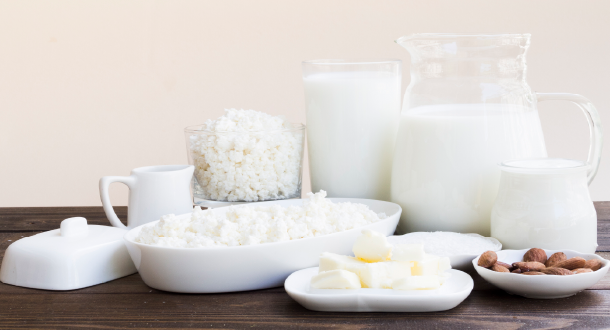
Let’s take the example of a dairy processing facility, where a single batch of raw milk is processed into multiple valuable outputs. The milk may be pasteurized and sold as pasteurized milk, while separation produces cream and skimmed milk. Further processing can then produce butter, whey, and casein, all originating from the same feedstock, with outputs that are entirely planned and expected. Yet historically, ERP systems have struggled to effectively manage this multi-output reality. This is exactly the challenge the Co-product feature in eWorkplace Apps‘ Process Manufacturing Suite (PMS) for Acumatica is built to solve.
What is a Co-Product in Manufacturing?
A co-product is a finished good that is produced simultaneously with the primary finished goods within the same production batch. Unlike a byproduct, which is an incidental output, a co-product is planned, commercially valuable, and intended for sale or further use.
For example, Pasteurized Milk is often considered the primary finished good produced in dairy processing, accounting for the largest share of total output. But what about the remaining portion of each batch?
The rest of the output consists of other valuable products, such as:
- Cream
- Butter
- Skimmed Milk
- Whey
- Casein
These products are not accidental outputs. They are planned and commercially valuable, which means they can be treated as co-products depending on the production and accounting structure. The difference between a primary product and a co-product is not about value or importance — it depends on which product is defined as the main item driving the production order, while the others produced in the same process are treated as co-products.
Difference Between Co-Product and By-Product
The terms co-product and by-product are often used interchangeably, which can sometimes create confusion. In reality, they represent two different manufacturing concepts.
| Criteria | Co-Product | By-Product |
|---|---|---|
| Definition | Planned output produced alongside the main product | Incidental output generated during production |
| Business Value | High commercial value | Low or minimal value |
| Production Planning | Expected and deliberately produced | Not the primary goal of production |
| Cost Allocation | Receives allocated production cost | Minimal cost allocation |
| Inventory Tracking | Tracked as a valued inventory item | May be recorded or disposed of |
| Example (Dairy) | Cream, Butter, Skimmed Milk, Whey | Butter Milk, Rinse Water |
Understanding this distinction is critical for accurate production costing and inventory tracking.
Why Traditional ERP Struggles with Multi-Product Manufacturing
Let’s understand the core problem. A dairy plant runs a milk separation and pasteurization process where a single production batch generates multiple products in the same production run. The expectations are clear, but the problem arises when this reality must be managed within an ERP system.
In most traditional ERP setups, a production order supports only one finished good item. If multiple finished goods are produced in the same process, does the user need to create multiple production orders? In many ERP systems, the answer is yes.
As a result, to record the production of pasteurized milk, cream, butter, whey, and casein, manufacturers are often forced to:
- Create separate formulas for each finished product
- Maintain separate Bill of Materials (BOM)
- Generate multiple Production Orders for a single batch
- Manually split and allocate raw material costs, labor, and overhead across all outputs
The result is:
- Significant operational overhead
- Duplicate data entry
- Inaccurate product costing and allocation
- Financial records that do not reflect the real production cost impact
Here, the gap is not in the process itself — it is in the software. This is exactly why eWorkplace Apps introduced a native Co-Product feature, so Acumatica can finally support true process manufacturing workflows.
A Feature-by-Feature Walkthrough of Co-Product in PMS
The co-product feature allows dairy processors and other manufacturing industries with multi-output products to define all finished goods — primary or secondary — against a single Formula and Bill of Material, then produce them under one Production Order. Here is how each capability works in practice.
Feature 1: Cost and Quantity Allocation Across Finished Goods and Co-Products
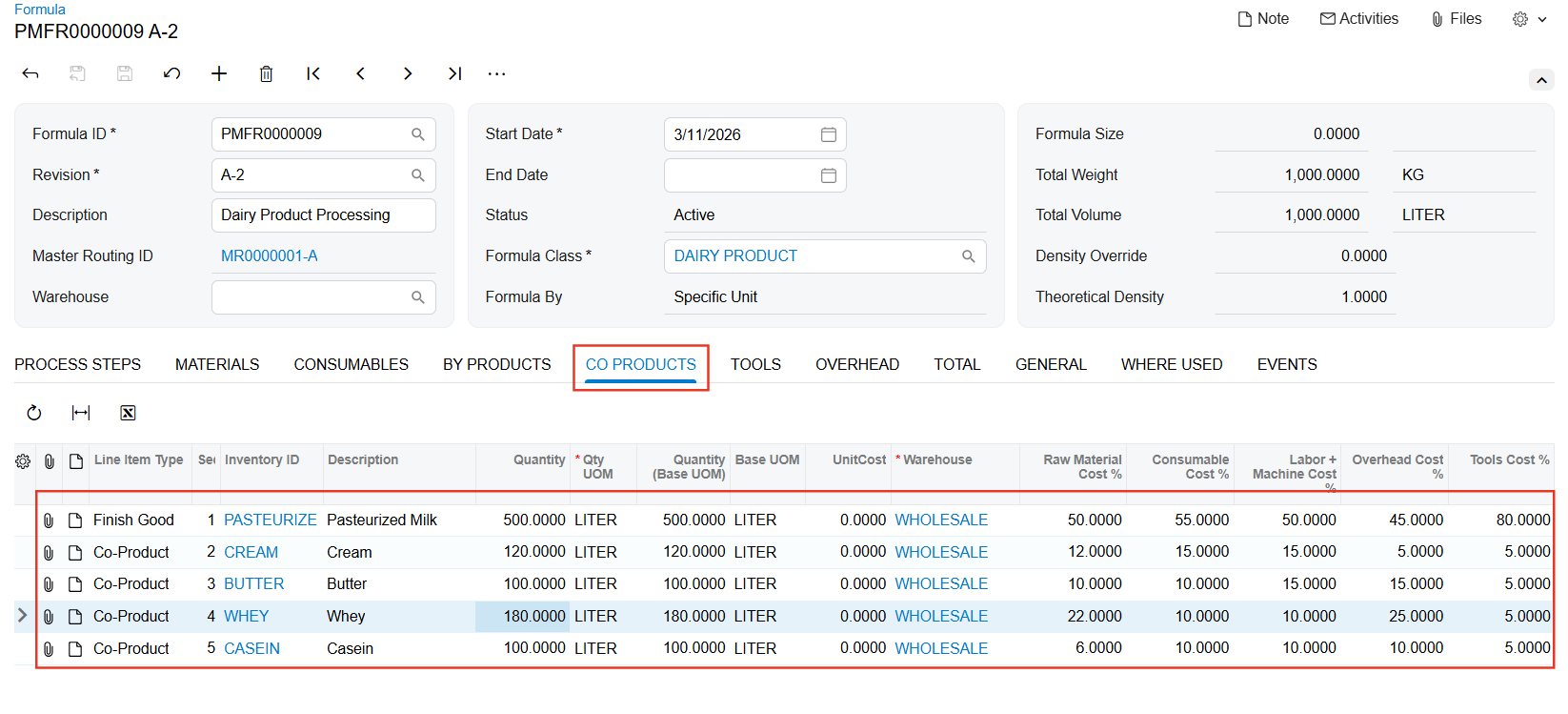
A new Co-product Tab has been introduced directly on the Formula screen within PMS. This is where multi-output production is configured at its foundation. It fundamentally changes how a dairy plant models its production in Acumatica.
Defining the Formula for a Dairy Batch
On the Co-Product Tab, a user defines every finished output tied to the formula. For a dairy processing formula, this means adding Pasteurized Milk as the primary finished good and then listing Cream, Butter, Skimmed Milk, Whey, and Casein as co-products within the same tab — in one screen, under one formula. For each output, the system captures:
- The finished good and the co-product
- Planned output quantity
- Quantity allocation with the proportion of the total batch output attributed to each product
Independent Cost Allocation
The most important aspect of this feature is how cost allocation is handled. Each cost bucket is treated as fully independent, rather than applying a single blended percentage across all outputs. The five buckets are:
- Raw Material
- Consumables
- Labor and Machine
- Overhead
- Tools
For each bucket, the user assigns a cost percentage to every co-product listed on the tab. A strict rule is enforced: the sum of all cost percentages within each bucket must be exactly 100%. Raw material costs might be split as 40% Pasteurized Milk, 20% Cream, 15% Skimmed Milk, 15% Whey, and 10% Casein. Labor and machine costs can follow a completely different split. This independence between buckets reflects how production economics actually work in dairy processing.
Planned Output Quantity
Quantity allocation defines the planned output quantity for each finished good and co-product that a batch is expected to yield. For example, a formula configured for 1,000 L of raw milk might plan for 450 L of pasteurized milk, 200 L of cream, 150 L of skimmed milk, 120 L of whey, and 80 kg of casein as outputs. When a smaller batch runs on 500 L of raw milk, the system automatically derives each output proportionally — without any manual recalculation.
Built-in Formula Activation Validation
A formula with co-products defined cannot be activated in PMS unless every cost bucket is fully allocated to 100%. If a user has assigned only 95% of the raw material cost across the listed co-products, the system blocks activation and flags the incomplete bucket. This validation ensures that no production order can ever be created from a formula with an incomplete cost setup — eliminating one of the most common sources of costing errors in process manufacturing before it ever reaches the production floor.
Feature 2: Proper G/L Mapping for Co-Products
Accurate cost allocation at the formula level is the first step. Making sure those costs flow correctly into Acumatica’s General Ledger automatically — for every output — is what makes the feature financially complete. The system automatically maps allocated production costs of each co-product to the appropriate G/L accounts in Acumatica, ensuring accurate financial tracking for every output generated from the batch.
Before vs. After: Workflow Comparison
| ❌ Before: Traditional ERP | ✅ After: PMS Co-Product Feature |
|---|---|
| One Production Order | One Production Order |
| Supports only ONE finished good | Supports all finished goods & co-products |
| Separate BOM & Formula per product | Single Formula with Co-Product Tab |
| Manual cost splitting & data re-entry | Automated cost % allocation per bucket |
| Inaccurate G/L entries, audit risk | Auto G/L mapping for every co-product |
| Financials don’t reflect reality | Accurate financials |
Real-World Examples Across Process Manufacturing Industries
The Co-Product feature is not limited to dairy processing. Any process manufacturing industry where a single batch generates multiple planned outputs can benefit. Here’s how it applies across industries:
Crude Oil Refining
- Primary Product: Gasoline
- Co-Products: Diesel, Kerosene, LPG, Bitumen
- Problem: Each output often requires separate production orders, even though they are produced in the same distillation run — leading to operational complexity and fragmented cost tracking.
- With PMS Co-Product: A single Formula and Production Order generates all outputs from the same refining batch, enabling automatic quantity tracking and cost allocation across all co-products.
Sugar Processing
- Primary Product: Refined White Sugar
- Co-Products: Molasses, Bagasse, Filter Cake
- Problem: Molasses and bagasse are often tracked separately with limited connection to the originating batch.
- With PMS Co-Product: When the batch size is created, co-product quantities update automatically, eliminating manual recalculation and separate production orders.
Edible Oil Refining
- Primary Product: Refined Cooking Oil
- Co-Products: Soapstock, Fatty Acids, Lecithin
- Problem: Soapstock disposal costs and revenue from recovered fatty acids are often tracked separately from the main refining batch.
- With PMS Co-Product: Each output carries its allocated cost and quantity, ensuring G/L entries reflect the accurate financial picture of the production batch.
Conclusion
Dairy processing is one of the clearest examples of a manufacturing reality that traditional ERP systems have historically failed to model correctly. But the same problem exists across every process industry where one batch, one formula, and one set of inputs produces multiple distinct sellable finished goods — from crude oil refining and sugar processing to edible oil refining, meat and poultry processing, and beyond.
eWorkplace Apps‘ Process Manufacturing Suite for Acumatica has always been built around the realities of process manufacturing. The Co-product feature is the next step in that commitment, bringing cost and quantity allocation and proper G/L mapping directly into the production workflow — so that every output from every batch is tracked, costed, and posted correctly from day one.
From One Batch to Many Products, Manage It the Right Way. Contact Us to learn how the Co-Product feature in eWorkplace Apps‘ PMS can simplify multi-output manufacturing.
Contact Us