













As a manufacturer, you fixed a problem, but did you fix what caused it?
Non-conformance management is not just about identifying a problem and correcting it, but also about understanding why it happened, identifying its root cause, and taking corrective and preventive actions so that the same issue does not recur.
Let’s take the example of a beverage manufacturer who discovers inconsistent fill levels during the quality inspection of a production batch. The affected bottles are identified and held, the filling machine is adjusted, and the batch is reworked before production continues. The immediate issue has been addressed, but a few weeks later, the same problem occurs again. Was the machine adjustment enough, or was there an underlying issue that was never identified?

This is where effective non-conformance management becomes important. Instead of treating each quality issue as an isolated incident, manufacturers can investigate the root cause, take appropriate corrective and preventive actions, and verify whether those actions are effective in preventing recurrence.
In this blog, we’ll explore:
- Understanding Non-Conformance and CAPA in Manufacturing
- Why Do Quality Problems Keep Coming Back?
- How CAPA Helps Break the Recurrence Cycle
- What an NC-CAPA Response Looks Like in Practice
- NC and CAPA in eWorkplace Apps’ Quality Management Suite (QMS)
Understanding Non-Conformance and CAPA in Manufacturing
Non-Conformance (NC) occurs when a product, material, or test result does not meet a defined quality standard. Recording an NC helps manufacturers document what went wrong, identify the affected product or process, and determine how the immediate issue should be handled. However, correcting the immediate issue does not necessarily eliminate its underlying cause.
For example, the manufacturer found that the bottles are leaking because of an incorrect sealing parameter and adjusts the machine to correct the affected batch. But what if the incorrect setting resulted from a calibration problem, maintenance gap, unclear work instruction, or operator training issue? Then adjusting the machine alone does not solve the underlying problem.
This is where Corrective and Preventive Action (CAPA) becomes important. Corrective action focuses on addressing the identified cause of a problem, while preventive action focuses on taking measures to reduce the likelihood of similar problems occurring. A CAPA process can connect the quality issue to investigation, root-cause analysis, defined actions, assigned responsibilities, and verification of whether those actions were effective.
In simple terms:
NC identifies what went wrong. CAPA helps determine why it happened, what needs to change, and whether those changes are effective in preventing the problem from recurring.
Why Do Quality Problems Keep Coming Back?
If the same quality problem keeps showing up, the issue may not be the way the defect was handled. The problem may be that its underlying cause was never addressed.
The immediate problem is fixed, but the cause is not
Going back to our beverage example, adjusting the filling machine may fix the inconsistent fill levels. But why did the machine have the wrong setting in the first place? It could be a calibration issue, a maintenance gap, an unclear work instruction, or a training issue. If the root cause is not identified, the same problem can easily return.
This is where an NC process can help. In eWorkplace Apps’ QMS, the Root Cause Analysis area allows the quality team to document the root cause of a non-conformance instead of simply recording what went wrong.
The same problem is handled repeatedly
Sometimes, recurring problems are treated as separate incidents. For example, if the same fill-level issue occurs several times, the team may correct the machine and close the NC each time. But looking at those NCs together may reveal a pattern. Historical NC data can help quality teams spot recurring defects and determine whether the issue is related to equipment, materials, procedures, suppliers, or other factors.
The NC-CAPA Dashboard in QMS provides visibility into NC defects, open NCs and CAPAs, and month-wise trends, making these patterns easier to identify.
Actions are taken, but no one checks if they worked
A procedure may be updated, equipment repaired, or employees retrained. But that does not necessarily mean the problem is solved.
The key question is simple:
Did the action actually work?
CAPA should therefore include a way to verify whether the actions taken were effective. In QMS, users can record investigation details, corrective and preventive actions, and verification results as part of the CAPA process.
The root cause is not explored far enough
Sometimes, the first answer is not the real answer.
For example, saying “operator error” may explain what happened, but it does not explain why the error occurred. Was the instruction unclear? Was the operator using an outdated procedure? Was the process difficult to follow?
Looking a little deeper can help identify what needs to change to prevent the same issue from happening again.
Quality information is spread across different areas
A recurring issue may involve information from several areas:
- QC test results
- Production records
- Material or supplier information
- Equipment history
- NC records
- Root-cause findings
- Corrective and preventive actions
- Verification results
When these activities are handled separately, it can be difficult to understand the complete history of a quality problem. Connecting the NC with its root cause and CAPA gives the quality team a clearer view of the issue. From what happened and why it happened to what was done about it and whether it worked.
How CAPA Helps Break the Recurrence Cycle
The goal of CAPA is not simply to create another quality record. It is to create a structured path from problem identification to prevention.
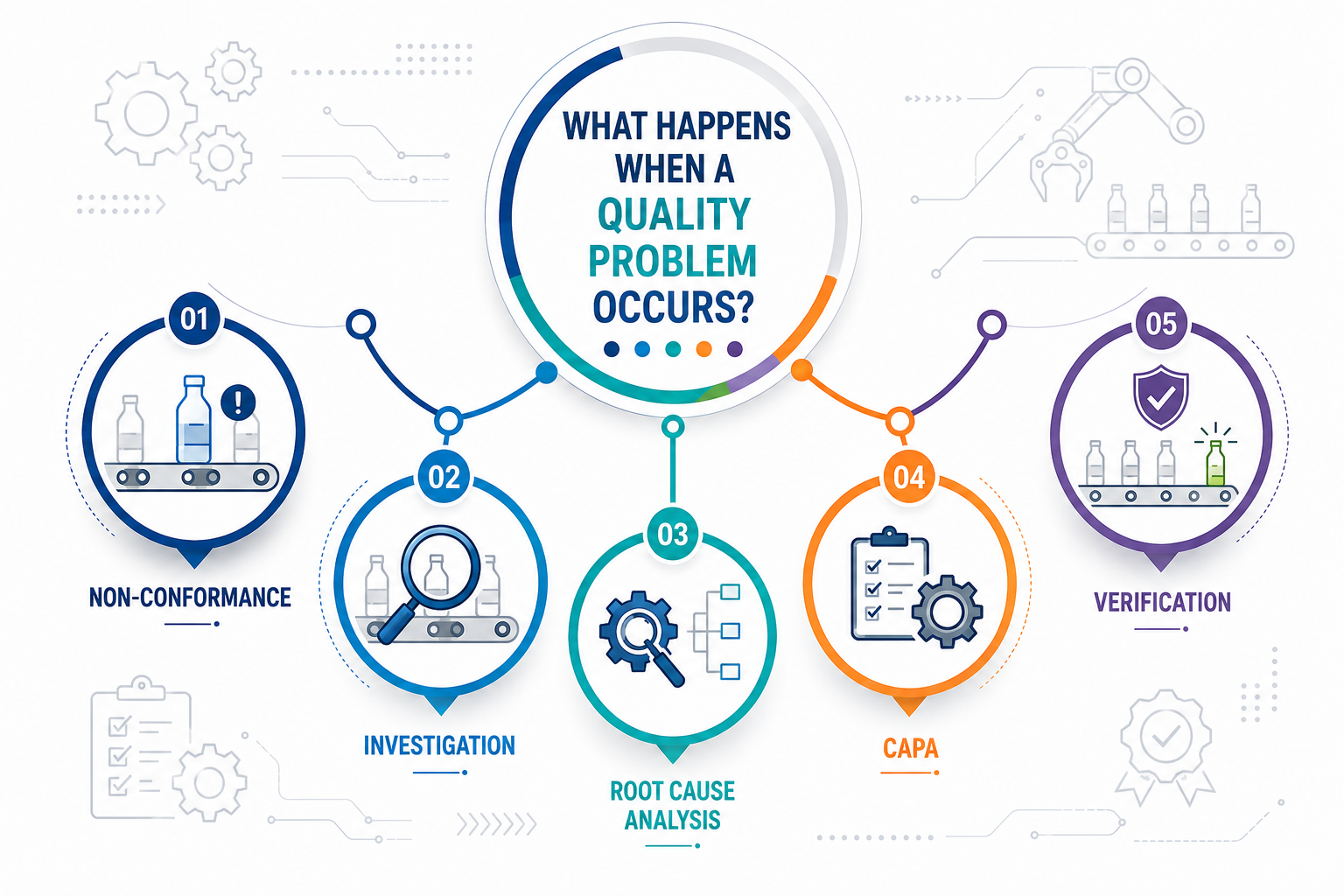
A practical NC-CAPA cycle looks like this:
1. Identify the non-conformance: Record what happened, where it occurred, and what requirement was not met.
2. Keep the issue contained: Identify and control affected material or products through the appropriate quality process.
3. Investigate the cause: Review the available information and determine why the non-conformance occurred.
4. Define corrective action: Determine what needs to be done to address the identified problem.
5. Define preventive action: Introduce changes that can reduce the likelihood of recurrence.
6. Assign and track actions: Give actions to the appropriate people and track their completion.
7. Verify effectiveness: Review the results to determine whether the actions actually address the problem.
8. Close with a complete history: Maintain the NC-CAPA record so the organization can refer to what happened, why it happened, and what was done.
This approach changes the conversation from:
“How do we fix this batch?”
to:
“Why did this happen, and what can we change so it doesn’t keep happening?”
What an NC-CAPA Response Looks Like in Practice
| Step | Example | Action |
|---|---|---|
| Quality Issue | Inconsistent fill levels are found during QC inspection. | Affected bottles are identified and held. |
| NC | The batch does not meet the defined fill-level requirement. | An NC is recorded for the affected batch. |
| Investigation | The filling machine had an incorrect setting. Further investigation finds that the machine calibration was overdue. | Root cause is recorded against the NC. |
| Corrective Action | The filling machine is recalibrated, and the affected batch is reworked. | Correct the immediate issue and rework the affected batch. |
| Preventive Action | The calibration schedule is reviewed and updated. | Add regular calibration checks to reduce the chance of recurrence. |
| Verification | Subsequent batches are checked for consistent fill levels. | Confirm that the corrective and preventive actions were effective. |
NC and CAPA in eWorkplace Apps’ Quality Management Suite (QMS)
eWorkplace Apps Quality Management Suite supports NC and CAPA as a connected quality process rather than treating them as isolated records. NCs can be generated automatically when configured QC results fail, or they can be created manually when a quality or process issue occurs outside a QC test.
For example, equipment damage during production can be manually recorded as an NC even when no test has failed. Once an NC is recorded, the quality team can document the root cause and add a CAPA. The CAPA workflow includes:
- Origin – Identify ownership, category, type, department, dates, and reason.
- Investigation – Document the investigation into the issue.
- Corrective Action – Record actions taken to address the identified problem.
- Preventive Action – Define actions intended to prevent recurrence.
- Verification – Record how the effectiveness of the actions is evaluated.
- Event History – Review the NC-CAPA transaction history.
CAPA can also be created manually when a potential risk, audit finding, customer complaint, or process concern requires structured action even when an NC does not exist.
A single NC can have multiple CAPAs when the issue requires different corrective or preventive actions. For example, if an incorrect machine setting is linked to both an overdue calibration and an unclear work instruction, separate CAPAs can be recorded for the same NC. One CAPA can address the calibration process, while another can focus on updating the work instruction.
The NC and CAPA Dashboard provides visibility into defects, open issues, CAPAs, and month-wise trends. This can help quality teams spot recurring issues and focus on areas that need improvement.
Conclusion
Quality problems will always be part of manufacturing. What matters is what happens after the problem is found.
If the response ends with “fix the defective batch,” the same issue may return.
But if the response continues with “find the cause, take corrective and preventive action, and verify that it worked,” manufacturers have a better chance of breaking the cycle.
That is where effective non-conformance management and CAPA can turn recurring quality problems into opportunities for lasting improvement.
Contact us to learn how NC-CAPA in eWorkplace Apps’ QMS can help prevent recurring quality problems.
FAQs
-
What Is the Difference Between Non-Conformance and Non-Compliance?
Non-conformance means a product, process, or result does not meet a defined requirement or specification. Non-compliance generally means failing to follow a required rule, regulation, procedure, or standard.
-
What Is the Difference Between Corrective Action and Preventive Action?
Corrective Actions are initiated in response to an identified non-conformance or existing problem. Their purpose is to address the cause of the problem and prevent the same issue from recurring. Corrective actions are reactive in nature and are typically linked to a specific NC.
Preventive Actions are initiated to address potential quality risks before a non-conformance occurs. These actions are proactive and focus on preventing possible issues based on trends, historical data, audits, or risk assessments. -
Can CAPA Be Created Without an NC?
Yes. CAPA can be created without an NC when a potential risk, audit finding, customer complaint, or process concern requires corrective or preventive action.
-
How Does Root Cause Analysis Help With Non-Conformances?
Root Cause Analysis helps identify why a non-conformance occurred instead of only addressing the immediate problem. Finding the root cause helps the quality team take appropriate action and reduce the chance of recurrence.
Contact Us